Using WeTransfer to transfer images for printing
WeTransfer is a file transfer service which will transfer one or more files to anyone with a valid email address. It's fast and easy to use, for both the sender and receiver of the photos.
The maximum total size of the files you can transferred at one time is 2GB. There is no charge, and no need to sign up for an account as long as you use the Free option as described here.
To use WeTransfer:
WeTransfer is a file transfer service which will transfer one or more files to anyone with a valid email address. It's fast and easy to use, for both the sender and receiver of the photos.
The maximum total size of the files you can transferred at one time is 2GB. There is no charge, and no need to sign up for an account as long as you use the Free option as described here.
To use WeTransfer:
- First, please locate and check the file(s) you want to submit: for easy identification on the receiving end, be sure the file name(s) begin with your initials (e.g. RTP_mywinningphoto.jpg); please rename them if necessary
- In your browser, enter the URL: https://wetransfer.com/upload (or just click this link: wetransfer.com/upload)
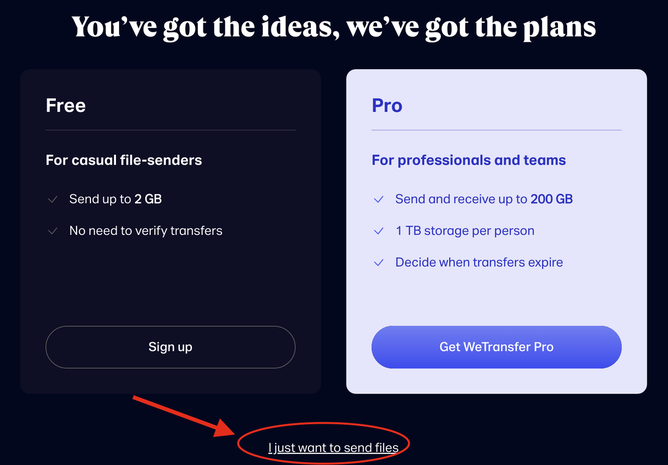
- You may see the following presented on a page at that link - if so, be sure to click on "I just want to send files" as circled at the bottom of the image below:
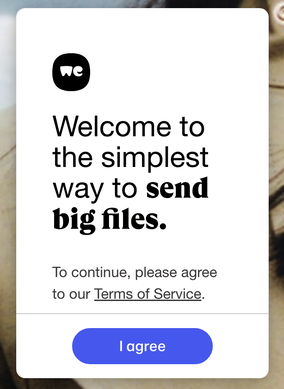
- If you are presented with the dialog below, you must agree to the terms of service - click "I agree" in the blue bubble:
- Eventually, you'll get to this dialog on a page that may show ads in the background:
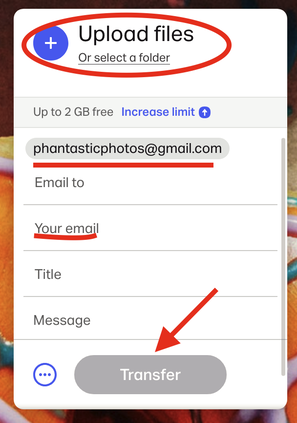
- Click on the "plus sign" labelled Upload files shown circled in red above. Use your computer's standard file selection popup box to select / open a photo file
- You can add additional files if desired, up to the 2GB limit
- When all files are selected, enter the email address of the recipient. Use: [email protected]
- Then enter your email address on the next line
- Enter a title and short message, identifying yourself and the reason you are submitting the photo(s)
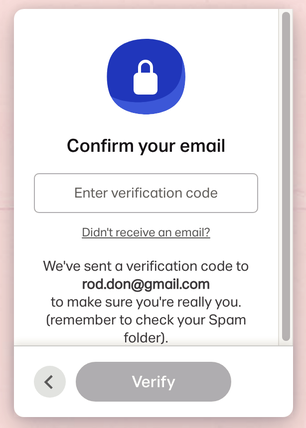
- Press Transfer. You will see another dialog to confirm your email (shown below). Look for an email from WeTransfer, and get the 6 digit verification code. Enter it in the dialog and press Verify:
- You'll need to wait while your selected file(s) is/are uploaded; a graphic will indicate the progress (it's pretty fast)
- Eventually you'll get a "You're done!" graphic indicating that your photos have been uploaded to WeTransfer, and that an email was sent to the recipient to notify them that the files are available to download (they will be available for 7 days)
- You will also get another email confirming that a link to the files was sent
- Finally, when the recipient actually downloads the files, you will receive yet another notification via email
- Please remember to name / rename your files before you get started so that the filename begins with your initials.
- There is no need to sign up for a WeTransfer account to use the free option!